
Overview
Within the Conetix Control Panel (WHMCS), there are two different types of records which may be linked to a client account:
- Users
- Contacts
Although these can appear similar, they are used for different purposes. Understanding the difference is important when deciding who should be able to log in, manage services, receive invoices, or receive support notifications.
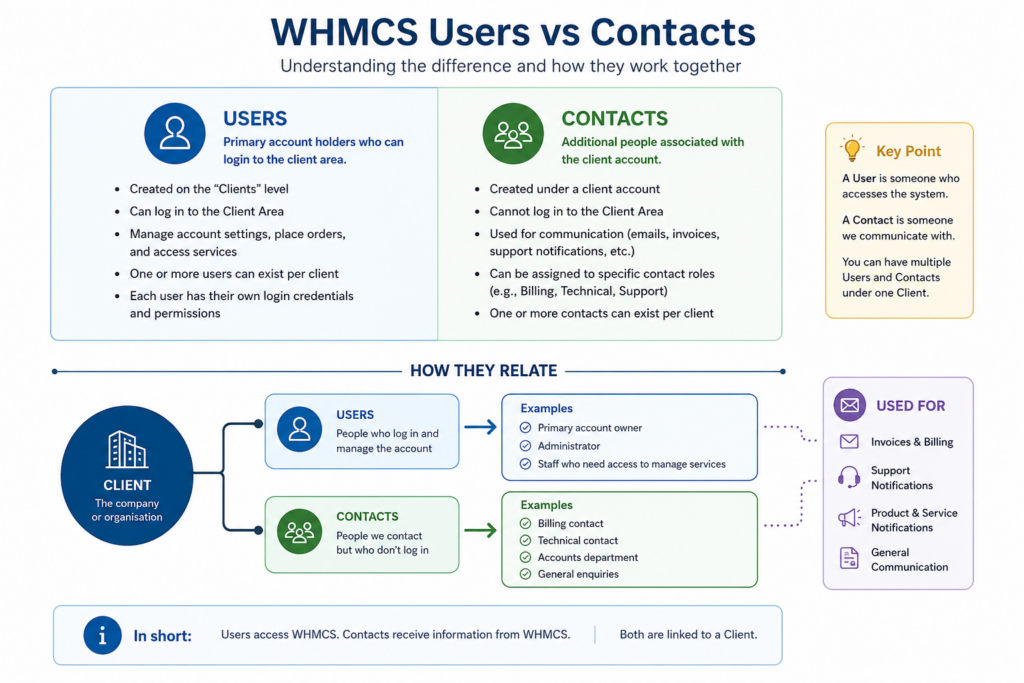
What is a User?
A User is someone who can log in to the Conetix Control Panel.
Users have their own login details and may be granted access to one or more client accounts. This is generally used when a person needs to actively manage the account, services, invoices, support tickets, or account settings.
A user may be:
- The main account holder
- A business owner
- A staff member who manages hosting or domains
- A developer or IT provider who needs access
- An accounts team member who needs to view and pay invoices
Users can have different permissions depending on what level of access they require
What is a Contact?
A Contact is an additional person or email address linked to a client account for communication purposes.
Contacts are generally used when someone needs to receive emails or notifications but does not necessarily need to log in to the Conetix Control Panel.
A contact may be:
- A billing contact
- A technical contact
- A support contact
- An accounts department email address
- A general enquiries email address
Contacts can be useful when multiple people within a business need to receive different types of notifications, such as invoices, support updates, product notices, or service-related emails.
Key Difference
The simplest way to understand the difference is:
Users can log in and access the account. Contacts receive communication about the account.
If someone needs to manage services, view invoices, pay invoices, open support requests, or update account details, they should usually be set up as a User.
If someone only needs to receive billing, technical, or support-related emails, they may only need to be added as a Contact.
When should I add a User?
You should add a User when the person needs to log in to the Conetix Control Panel.
Common examples include:
- A business owner who manages the account
- A staff member responsible for invoices
- A developer who needs to access hosting services
- An IT provider who manages domains, DNS, or support tickets
- A team member who needs permission to submit support requests
Users should only be added where account access is required.