
Overview
Websites and web servers have the ability to send information back to a web browser to let it know what features and security it should implement. What’s important to remember is that despite automated tools spitting out detailed reports, there’s no one size which fits all.
Blindly making changes without understanding what they mean could affect the performance of your website, features and even stop it working at all. Like everything security wise, it’s about finding the right balance for your website and ensuring that you understand the risks correctly before making changes.
Nearly all of these headers only increase your website security by a small margin (if at all). Conetix recommends ensuring all of the recommendations in our Keeping your WordPress website secure article are completed before worrying about HTTP headers.
What is a HTTP Header?
Think of it like a Word document. The header is the section at the top before you get to any content. Similarly, HTTP headers are sent first by the server and processed by the browser before any information is processed.
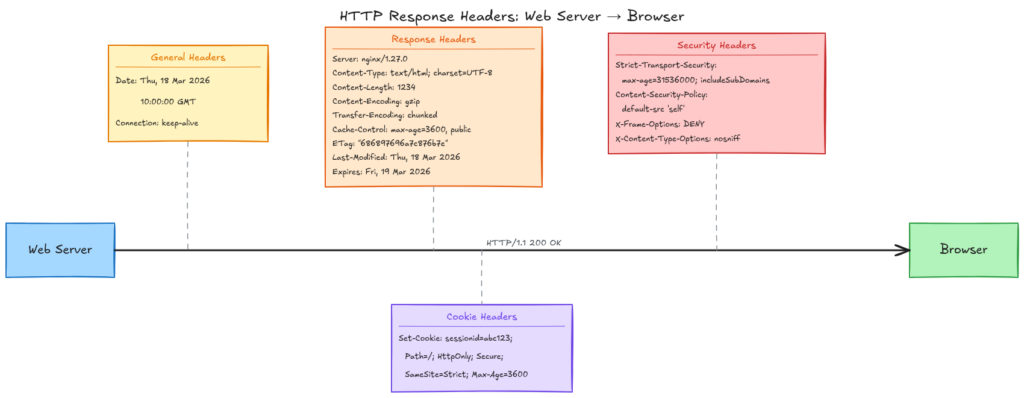
The Headers
There are 6 key headers which set a number of different settings for you to consider setting. If you don’t set any, don’t panic. The majority of small business websites have little to no security headers set and they function just fine.
HTTP Strict Transport Security (HSTS)
Once loaded, this ensures that the browser can’t downgrade a connection at a later stage to use HTTP. It does this by caching a value within the browser. If a malicious website attempts to force a request via HTTP for your site, your browser will reject the request.
HSTS then has two options, one is age (how long to cache the request not to downgrade) and if all sub-domains should be included.
Conetix Recommendation
Strict-Transport-Security: max-age=15768000Enable HSTS and ensure 6 months (15768000) or greater is set. If you know all subdomains are fine to be HTTPS, you can also explicitly add includeSubDomains.
Strict-Transport-Security: max-age=15768000; includeSubDomainsFurther Reading
- https://developer.mozilla.org/en-US/docs/Web/HTTP/Reference/Headers/Strict-Transport-Security
- https://conetix.com.au/support/what-is-hsts/
Content Security Policy (CSP)
This tells the browser what resources are allowed to be loaded for the site. This includes scripts, images, stylesheets and other similar assets. The intent is to limit attacks against Cross Site Scripting (XSS), which is where a website loads content from another site without validating it properly.
Conetix Recommendation
This one doesn’t have a simple setting you can simply enable. If you have integration with other services (for example, Facebook) then you need to explicitly generate and include these sites in the allowed list of assets. The more complicated your site is, the more complex this is to implement.
If your website is very simple, you can simply set:
Content-Security-Policy: default-src 'self';This will only allow assets to be loaded from your own website and nowhere else.
For most websites, you’ll need to conduct a review and then generate an output. This will then require testing (eg via a staging site) and using your browser developer tools to determine if anything has been blocked. Expect this to be a process you need to iterate over dozens of times to get correct.
We have a basic CSP Header Generator to help you get started. This tool only scans the main page, so if you have additional scripts loaded on different parts of your website (eg for a checkout), you will need to manually review each of these pages to confirm if extra items are required or not.
Further Reading
https://developer.mozilla.org/en-US/docs/Web/HTTP/Guides/CSP
X-Frame-Options
The X-Frame-Options header tells the browser if it’s allowed to load in an embedded sense within another website. This can be used to exploit with clickjacking, where a malicious website may load your content but trick the user into clicking on a link to their form to phish for details or similar.
Conetix Recommendation
In most instances, this one should simply allow iframes etc if it’s within the same site:
X-Frame-Options: SAMEORIGINThis can be required at times for things such as WordPress page builders like Elementor, so that the builder and preview can work.
Further Reading
https://developer.mozilla.org/en-US/docs/Web/HTTP/Reference/Headers/X-Frame-Options
Referrer-Policy
This sets how much information your website should share with other websites when a user clicks on a link. For example, if your website links to a supplier then by default they’ll receive information about where the link came from.
Conetix Recommendation
This will vary depending on your website and how much information you wish to send to others. For most normal websites (ie, where users just browse your website and don’t login), you can simply set:
Referrer-Policy: strict-origin-when-cross-originThis will ensure that information is passed on about where the referrer came from (but only the base URL, eg https://conetix.com.au), as long as it’s not to a HTTP (unsecured) link when the link is to an external site.
For example, if I have a website page https://conetix.com.au/blog/article-name and it contains links, this is what would be sent through:
| External URL | Referrer Information |
| https://conetix.com.au/support/ | https://conetix.com.au/blog/article-name |
| https://www.google.com | https://conetix.com.au/ |
| http://oldwebsite.com | <None> |
This is in fact the default anyway, however most security scan tools may throw an error if it’s not explicitly set so it’s easiest to set it regardless.
Further Reading
https://developer.mozilla.org/en-US/docs/Web/HTTP/Reference/Headers/Referrer-Policy
X-Content-Type-Options
X-Content-Type-Options tells the browser if it should guess the correct media type or if it should use the media type specified for the request.
For example, if a webserver specifies that the file is an image (eg JPEG) but it’s actually JavaScript returned, the X-Content-Type-Options header will tell the browser if it can override what the webserver returned. When there are compromised websites, this may be used to trick the browser into loading (and therefore processing) content differently to what was expected.
Conetix Recommendation
Disable the browser loading it differently to what’s specified by the webserver by setting:
X-Content-Type-Options: nosniffWhile it will only affect your website if it’s got malicious content, there’s generally no harm in setting it.
Further Reading
https://developer.mozilla.org/en-US/docs/Web/HTTP/Reference/Headers/X-Content-Type-Options
Permissions-Policy
The Permissions Policy header defines what features of the browser device it would like to request access for. For example, if you have a mapping system or a store locator for your website, you may require access to geolocation so that you can automatically show the nearest stores.
Depending on the complexity of your website, there’s access to other features such as cameras, bluetooth, ability to go full-screen, gyroscope / accelerometer, idle detection and more.
The header also works in reverse, ie you can explicitly deny access to features in case of a compromise.
Conetix Recommendation
For most standard sites, no extra features of the browser are required and you can simply set:
This will disable access to the camera, microphone, geolocation but allow autoplay of videos / media and allow fullscreen access
Permissions-Policy: camera=(), microphone=(), geolocation=(), autoplay=(self), fullscreen=(self)If you have a map / automatic store locator, you may need:
Permissions-Policy: camera=(), microphone=(), geolocation=(self), autoplay=(self), fullscreen=(self)This will allow any part of the website to access the user’s location and for most browsers it will still explicitly ask before sending the location as well.
Further Reading
https://developer.mozilla.org/en-US/docs/Web/HTTP/Reference/Headers/Permissions-Policy
How do I implement?
The headers can be set via the .htaccess file for your website, which then helps to keep the settings if you migrate your website. We have a step by step article on Setting HTTP Headers for your Website available to follow.
Alternatively, have a chat to your web developer to assist with implementation and please feel free to send this link along to assist.
Conclusion
HTTP Security Headers are like the final bit of icing on a cake. If you haven’t got the cake made correctly, then no amount of icing (no matter how neat) is going to save it.

Website security is exactly the same. If your website isn’t kept up-to-date and you’re not ensuring credentials are unique per login then none of the headers mentioned about are going to prevent your website from being hacked.
We often only see the conversation around “missing” headers when some automated tool has spat out a report. If you’re paying for these reports, make sure you’re also paying someone to review the report as well.
Lastly, if you’re a Conetix customer and need assistance with this, we include a review in our Managed WordPress plans.