
Overview
When utlising a shopping cart on your WordPress website, we have seen that products pages can break, showing no content. This is a uncommon occurrence, but very disruptive to the operations of the site. Below we have shown how to identify and fix the product pages.
Confirming the Issue
Whether you are viewing as an Admin or as a Customer, product pages load no content, however, checking for them in the backend, you can see that the product pages do exist.
Applying the Fix
- In WordPress on the left-hand Menu, hover over Settings and Click Permalinks from the side Menu that appears:
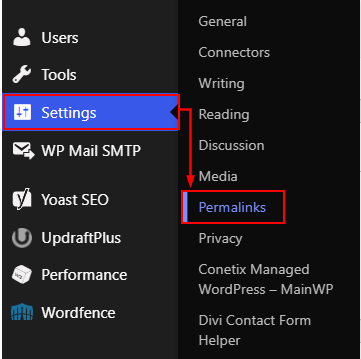
- On the Permalinks page, you will want to scoll to the bottom of the page making no changes and click Save Changes.
- Once Permalinks have been resaved, all broken pages should be fixed, you will want to confirm a previously broken page is now working.
If they are still displaing incorrectly, you can reach out to Conetix on 1300 789 260 or email us at support@conetix.com.au and we can take a look, if you have a developer check in with them as well.