
Table of Contents
WordPress 7.0 was released on the 20th of May (2026), and unlike the incremental improvements we’ve seen in recent point releases, this one is definitely the start of something big.
Why this is a big deal
The last time WordPress saw a structural shift this significant was WordPress 5.0 in 2018, when Gutenberg arrived. That change introduced the block editor and fundamentally altered how we create content. While it wasn’t overly polished in the first release and caused quite a stir, it has been evolving over the years and slowly becoming feature complete.
Let’s go through some of these changes.
AI finally arrives for WordPress
WordPress 7.0 doesn’t ship with a proprietary AI writing tool. Instead, it ships with a provider agnostic system to allow you to connect your existing AI provider.
Out of the box, it supports OpenAI, Google AI, and Anthropic. Because of the agnostic architecture (meaning it’s not developed around just one or two providers), plugin developers can register additional providers with ease.
This matters because, until now, AI features in WordPress were fragmented. Plugins which enhanced WordPress capabilities were limited and required separate configuration. WordPress 7.0 changes this by providing a standardized API that plugins can hook into.
For site owners, this means:
- One place to configure AI credentials
- Consistent behaviour across plugins that use AI
- No vendor lock-in—you can switch providers without reconfiguring every plugin
It should be noted that the current implementation is still very limited. This should be seen as the start of the WordPress AI push, rather than the final destination. At present, you can:
- Generate images
- Generate meta description
- Generate a summary
- Review your content and make suggestions
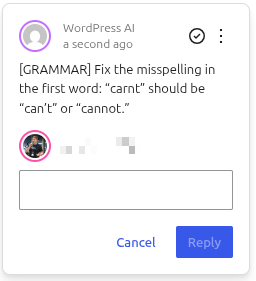
We expect that once these initial tools get a lot more real-world use, we’ll start to rapidly see improvements to how they operate. Those looking for AI content generation (eg to write an article) will have to wait a bit longer, as it has not been included in this release. This is something on the roadmap (including type ahead to suggest content as you’re writing) but without any ETA at this stage.
The Admin Dashboard got a long-overdue refresh
The WordPress Admin has been a bit of a mess for a while, especially with freemium plugins plastering popups and alerts everywhere. In fact, the WordPress admin interface hasn’t seen a meaningful visual update since 2013. WordPress 7.0 Admin isn’t a huge leap forward but definitely a very welcome refresh.
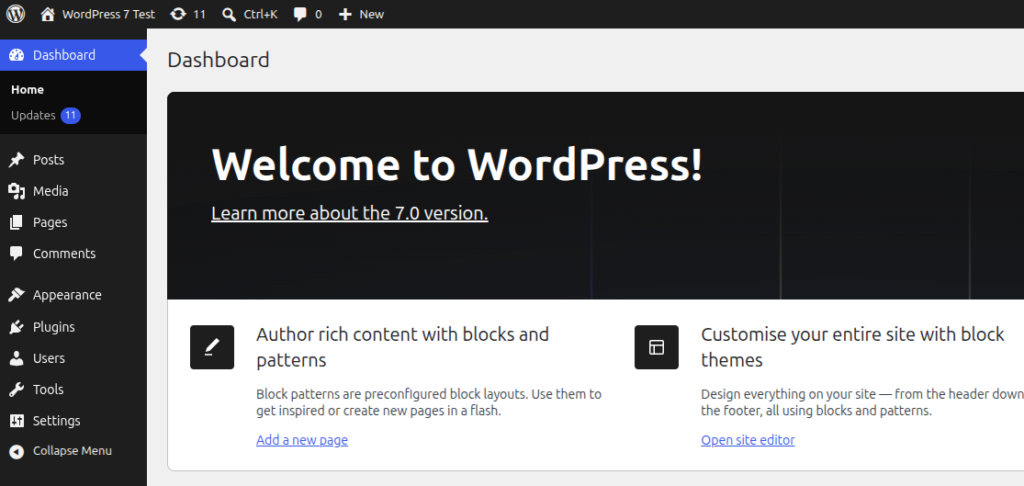
While subtle, the “Modern” admin theme adds a splash of colour as well as some UX enhancements such as transitions between pages. These changes may not seem like much to start with, but after using and comparing back to older WordPress versions you’ll clearly see the differences. The experience is definitely nicer now in WordPress 7.0.
The Command Palette is now available across the entire dashboard, not just the editor. Hit Cmd+K (Mac) or Ctrl+K (Windows), and you get a quick-search interface for navigating WordPress—no more hunting through menus.
Of course, there’s still plenty of work to do in the admin area and this is far from complete. We’re hoping to see further changes in the releases beyond 7.0 to continue the much needed work in the admin area.
New blocks and editor enhancements
WordPress 7.0 also adds some new blocks and enhancements, as the overall Gutenberg experience continues to evolve:
- Breadcrumbs Block: Native navigation breadcrumbs without needing a separate plugin
- Icon Block: Direct access to an icon library within the editor
- Navigation Block: Better controls for menus on mobile devices
- Headings Block: Easier ways to structure your document headings
- Cover Block: Now supports video backgrounds
- Grid Block: Better responsive behaviour on different screen sizes
There’s also a new Font Library available for all themes (not just block themes), and images are now processed in your browser before uploading—which means faster uploads and less work for your server.
Performance
There’s no two ways about it, WordPress 7.0 is definitely faster. There’s been work on both frontend and backend performance, meaning not only is it faster for you to edit and navigate around but it’ll be faster for your customers as well.
As a hosting provider who strives to ensure we have highly performant systems, seeing continual performance enhancements is always good news to us and our customers. When combined with PHP 8.4 or higher, WordPress is really flying along!
Visual Revisions
WordPress Revisions are an unsung hero of the WordPress platform. Each change you make is saved in the database, allowing you to quickly go back and revert changes. In previous versions, this displayed the raw code which isn’t the most user friendly. With WordPress 7.0, this now has a visual revision comparison tool:
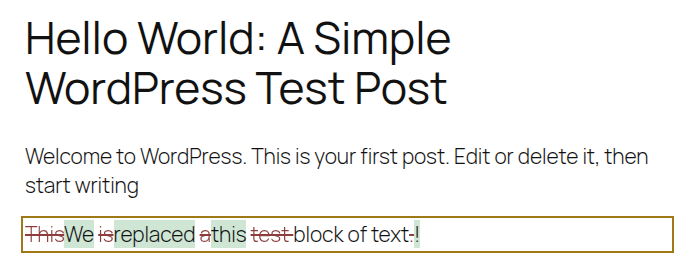
This will hopefully lower the required technical expertise to use and ensure users can see exactly what has changed.
Technical requirements: The PHP bump
WordPress 7.0 raises the minimum server requirements:
| Minimum PHP Version: | 7.4 (support for PHP 7.2 and 7.3 is dropped) |
| Recommended PHP Version: | 8.3 or higher |
Of course, all Conetix hosting customers get the ability to change PHP versions anytime they wish. We support up to the latest PHP 8.5 (including of course PHP 8.2, 8.3 and 8.4), but recommend you create a staging copy of your website first to test and ensure all plugins and your theme is 100% compatible first.
What didn’t make the cut
Originally, the Real-Time Collaboration (RTC) feature to allow multiple editors to all work at once was meant to be released with WordPress 7. However, this feature was pushed back to allow for further development and to ensure it’s production ready. Synchronising data and changes without losing data isn’t a trivial thing to do and even with a delayed release we would expect a few edge cases to appear once there’s wider testing among the WordPress community.
When it does arrive, it means no more locked posts! Multiple editors will be able to work on the same page or post, very much like Google Docs has had for many years. This will be a massive boost for agencies where they’re working on multiple parts, especially if they’re working remotely.
What Conetix is doing
Of course, we’re not just watching these changes from the sidelines.
We’re building the Conetix AI Platform—a managed AI integration layer for WordPress that takes advantage of the new AI Connectors framework in WordPress 7.0. If AI isn’t your forte, we want to make the process simple and using our platform we’ll choose the best systems in our backend to ensure you get the right mix of correct results, privacy and speed.
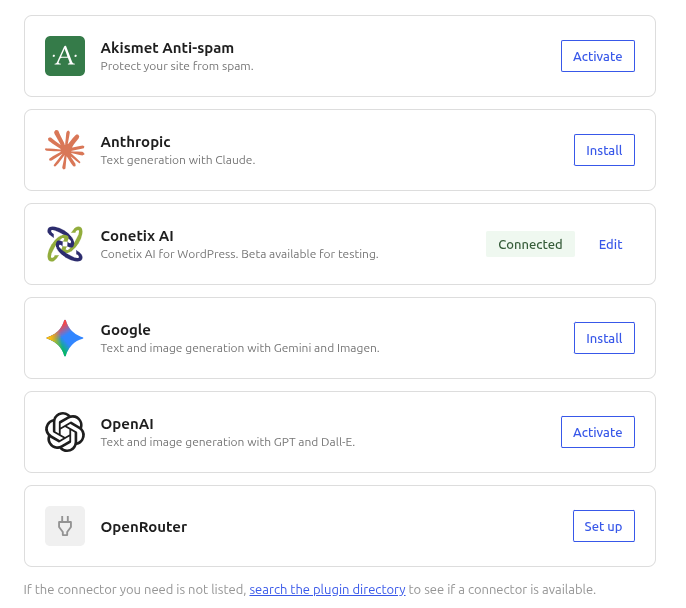
Our aim is to make this simple. The AI features will be powerful but do require the setup of API keys and accounts with external AI providers. We’re working out pricing and details for higher users but will likely include a basic usage tier for free, with low-cost options to upgrade to generate more images and text.
We’re not deploying our own models, but instead based on testing we’re curating those best suited to the task and with high levels of data privacy. Your content always remains your content and won’t be used for training nor retained.
The Real-Time Collaboration (when it arrives) also requires hosting infrastructure in place to ensure it works efficiently. Conetix has already started building our own services to offer this as a no-cost service for all Conetix customers.
Preparing for WordPress 7.0: A Quick Checklist
Before you hit update today, here’s what we recommend:
- Create a Backup. It’s important to have a fallback point and we of course always recommend ensuring you have a backup before making any changes.
- Check your PHP version. Minimum 7.4 required, 8.3+ recommended.
- Test on staging first. Don’t update production without verifying theme and plugin compatibility.
- Audit your plugins. Check for any plugins that modify how posts are displayed in the admin—some may need updates. If you’ve updated the PHP version too, make sure the plugin is fully compatible with that version.
- Consider waiting. The first bugfix release (7.0.1) typically drops within a week or two. Unless you need the features immediately, giving the community a few days to surface any issues is reasonable.
Managed WordPress customers will have WordPress update automatically to 7.0. Testing has already begun on a limited number of sites to ensure compatibility and we will progressively roll this out for all customers.