Overview
This support article describes how to subscribe/unsubscribe to IMAP Folders in Thunderbird.
Why You Subscribe to Folders:
- To see certain folders in Thunderbird: IMAP servers (like Gmail or Microsoft 365) may have many folders (e.g. Spam, Promotions, Archive, custom labels). By subscribing to them, you make those folders visible and accessible in Thunderbird.
- To sync and download messages: Only subscribed folders are actively synced with the server, so subscribing ensures Thunderbird downloads and keeps those emails up-to-date.
- To organise your email efficiently: If you use labels or folder rules on the server, subscribing ensures Thunderbird reflects the same structure.
Why You Unsubscribe from Folders:
- To reduce clutter: You might not want to see every folder, especially system or archival folders you rarely use.
- To improve performance: Fewer folders being synced means Thunderbird can operate faster, with less data to handle.
- To avoid syncing unnecessary mail: Some folders may contain old, automated, or unimportant emails. Unsubscribing prevents Thunderbird from downloading their contents.
Example:
If you use Gmail in Thunderbird:
- You might subscribe to
[Gmail]/Sent Mailto view your sent emails. - You might unsubscribe from
[Gmail]/All Mailto avoid downloading duplicates of everything.
This is especially useful for users managing large mailboxes or multiple accounts.
Instructions
- Open Thunderbird email client.
- Next Right-click on your Email address, then select Subscribe.

- From this popup you can Subscribe/Unsubscribe IMAP folders as required.
Tick the box to Subscribe, Untick to Unsubscribe.
Click OK to save.
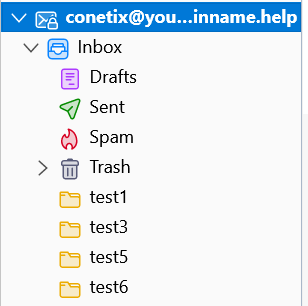
In this example all folders are Subscribed except test2, test4.
Mailbox view, folders test2 and test4 are unsubscribed and not displayed: